In the world of data engineering and workflow orchestration, Apache Airflow has emerged as a powerful tool for managing complex data workflows. One of the key concepts in Airflow is the Directed Acyclic Graph (DAG), which represents a workflow of tasks. Understanding how to manage and reset DAG runs is crucial for data engineers and analysts. In this article, we will delve into what a DAG run reset is, why it is important, and how it can be effectively utilized.
What is Apache Airflow?
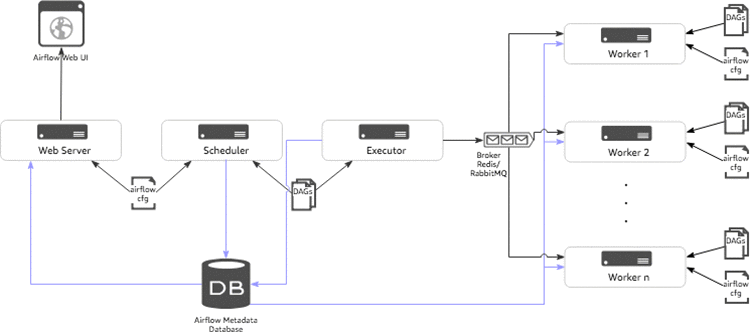
Apache Airflow is an open-source platform that allows users to programmatically author, schedule, and monitor workflows. It is designed to manage workflows as code, providing flexibility and scalability for data processing.
- Workflow Management: Airflow allows users to define workflows using Python code, making it easier to manage complex data pipelines.
- Task Scheduling: Airflow’s scheduler executes tasks on a defined schedule, ensuring that data workflows run as expected.
- Monitoring: Users can monitor the status of their workflows and tasks through a user-friendly web interface.
What is a DAG?

A Directed Acyclic Graph (DAG) is a finite directed graph with no directed cycles. In Airflow, a DAG is a collection of tasks that define a workflow. Each task represents a single unit of work, and the relationships between tasks define the order in which they are executed.
- Directed: The tasks have a specific direction in which they flow, indicating dependencies.
- Acyclic: There are no cycles in the graph; a task cannot depend on itself either directly or indirectly.
Understanding DAG Runs

A DAG Run in Airflow is a specific execution of a DAG. Each time a DAG is triggered, a new DAG Run is created. This can occur on a schedule, as a result of a manual trigger, or in response to external events.
- Scheduled Runs: Automatic execution based on the defined schedule interval.
- Manual Runs: Users can manually trigger a DAG run through the Airflow UI.
- Backfill Runs: Executing past DAG runs that may have been missed.
What is a DAG Run Reset?

A DAG run reset refers to the process of resetting the state of a specific DAG run within Apache Airflow. This can be necessary for various reasons, such as correcting errors, re-running failed tasks, or adjusting the workflow based on new requirements.
Reasons to Reset a DAG Run

There are several scenarios in which a DAG run reset may be needed:
- Task Failures: If a task fails during execution due to a transient issue (e.g., a temporary network failure), resetting the DAG run allows the workflow to be re-executed from the point of failure.
- Data Corrections: If the underlying data changes, it may necessitate re-running the entire DAG to ensure data integrity.
- Development and Testing: During the development phase, it is common to reset DAG runs to test new features or fixes.
How to Perform a DAG Run Reset

Resetting a DAG run in Airflow can be done through the user interface or programmatically via the Airflow CLI. Below are the steps for both methods:
Using the Airflow UI
- Navigate to the “DAGs” section of the Airflow web interface.
- Select the specific DAG you want to reset.
- Click on the “Graph View” or “Tree View” to see the current runs.
- Locate the DAG run you want to reset and click on it.
- Select the “Clear” option to reset the tasks associated with that run.
- Confirm the action, and the tasks will be reset to their initial state.
Using the Airflow CLI
For users who prefer command-line interfaces, resetting a DAG run can also be accomplished with the following command:
airflow tasks clear -d <dag_id> --start_date <start_date> --end_date <end_date>Replace <dag_id>, <start_date>, and <end_date> with the appropriate values. This command allows you to specify the DAG and the date range for which to clear the task states.
Considerations When Resetting a DAG Run
While resetting a DAG run can be a powerful tool, there are several considerations to keep in mind:
- Dependencies: Ensure that resetting a DAG run does not disrupt dependencies with other DAGs or tasks.
- Data Integrity: Consider the implications of re-running tasks on data consistency and integrity.
- Monitoring: Keep track of which DAG runs have been reset, as this can impact performance metrics and monitoring dashboards.
Case Study: Real-World Application of DAG Run Reset
Consider a company that processes large volumes of data from various sources, including APIs, databases, and file systems. They utilize Airflow to orchestrate their ETL (Extract, Transform, Load) processes. One day, a critical API that feeds data into their workflow experiences downtime, causing several tasks to fail during a scheduled DAG run.
To maintain data integrity and ensure that their analytics remain accurate, the data engineering team decides to reset the affected DAG run. They follow the steps outlined above to clear the failed tasks, allowing them to re-execute only the necessary components of the workflow without disrupting the rest of the data pipeline.
Best Practices for Managing DAG Runs
To effectively manage DAG runs and their resets, consider implementing the following best practices:
- Use Unique Identifiers: Assign unique identifiers to DAG runs for easier tracking and management.
- Implement Logging: Maintain logs for all DAG runs and resets to facilitate troubleshooting and audits.
- Monitor Performance: Use Airflow’s monitoring tools to keep an eye on task performance and potential bottlenecks.
- Test in Development: Before resetting DAG runs in production, test the process in a development environment to avoid disruptions.
Understanding DAG run resets in Apache Airflow is essential for data engineers looking to maintain the integrity and efficiency of their workflows. By grasping the concept of DAGs, recognizing when to reset a run, and using best practices for management, teams can ensure that their data pipelines function smoothly and adapt to changing requirements. As workflows become increasingly complex, the ability to reset DAG runs effectively will remain a valuable skill in the data engineering toolkit.
In summary, Apache Airflow is a powerful orchestration tool that allows for flexible and efficient workflow management. A DAG run reset serves as an essential feature that enables teams to address issues, adapt to changes, and maintain data integrity. By leveraging the capabilities of Airflow and understanding the intricacies of DAG runs, organizations can optimize their data processes and drive better decision-making.